
A practical guide to evaluating an employee communication platform that strengthens alignment, improves visibility, and supports every team at scale.
Mid-market teams reach a breaking point when communication gaps start dragging down operations. Messages get buried. Frontline feedback arrives too late. Leaders lose visibility into what teams actually know and what they need next. That lack of clarity undermines consistency, customer experience, and retention.
If you’re evaluating an employee communication platform, it’s likely because the current mix of email, chat threads, and departmental tools can’t maintain alignment at scale. You need one place to streamline updates, automate notifications, boost engagement, and keep every employee connected—from corporate teams to frontline staff. Not only that, it needs to integrate seamlessly with Microsoft Teams, Slack, Outlook, human resources information systems (HRIS), and all the other tools your workflows depend on.
From here, the next step is to make a clear comparison, understanding which platforms can actually support your people and which ones just add more tools to manage.
Key takeaways
- Unified communication platforms reduce operational gaps and streamline cross-department alignment
- AI-powered workflows improve visibility, speed, and decision-making across teams
- Mobile-first access and enterprise-grade governance ensure consistent communication at scale
Top 10 employee communication platforms
The platforms below represent typical options mid-market IT, operations, and CX leaders evaluate during BOFU decision-making. Some prioritize real-time chat or collaboration, while others focus on structured internal updates, targeted messaging, or frontline engagement.
| Platform | Unififed communication channels | AI workflows | Frontline and distributed team support | Integration with existing systems | Security, governance, and reliability |
| RingEX | Yes | Yes | Yes | Yes | Yes |
| Slack | Yes | Limited | No | Yes | Yes |
| Microsoft Teams | Yes | Limited | Yes | Yes | Yes |
| Zoom | Yes | Yes | No | Yes | Yes |
| Workplace from Meta | Yes | No | Yes | Yes | Yes |
| Connecteam | No | No | Yes | Yes | Yes |
| Staffbase | No | Limited | Yes | Yes | Yes |
| Firstup | No | Limited | Yes | Yes | Yes |
| Google Workspace | Yes | Limited | Yes | Yes | Yes |
| Asana | No | Yes | No | Yes | Yes |
1.RingEx
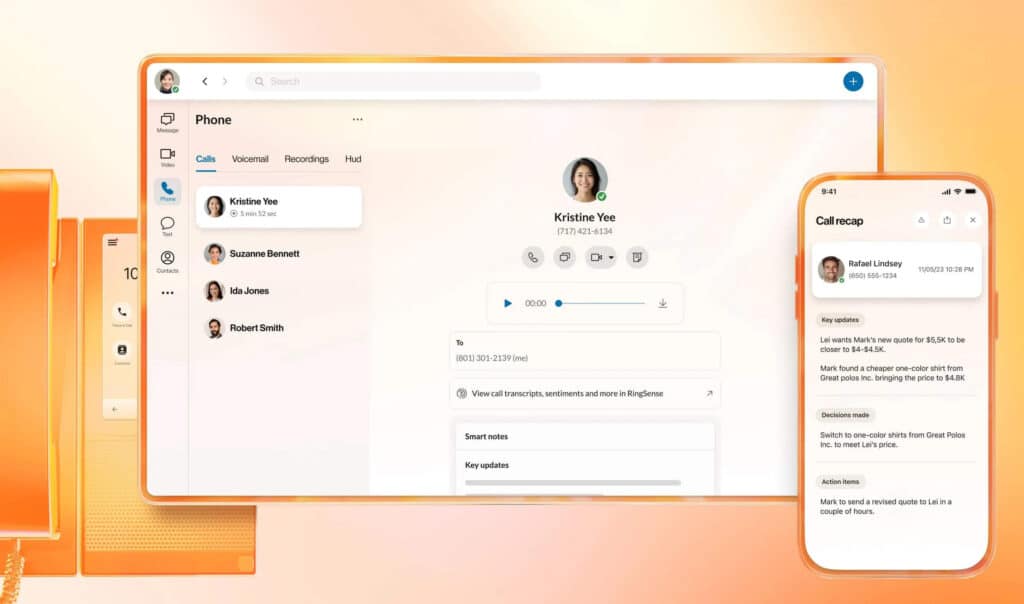
RingEX is RingCentral’s flagship employee communication platform that unifies real-time voice, video, messaging, SMS, and collaboration in a single workspace. Built with embedded agentic voice AI, RingEX automates workflows, enhances real-time chat and notifications, and bridges frontline and corporate communications while integrating with your existing systems.
Pros
- Unified voice, video, and messaging across channels
- AI-powered actions before, during, and after conversations
- Deep integrations with existing tech stack
- Cross-channel workflow automation and real-time communication
- Reduced tool sprawl via an all-in-one platform
Unified voice, video, and messaging in one platform
RingEX consolidates core communication modes into a single platform, eliminating app hopping and increasing visibility into team activity, project updates, and company news.
AI assistance before, during, and after conversations
AI Conversation Expert (ACE) applies agentic intelligence across calls, chats, and meetings, generating summaries and surfacing real-time insights to reduce manual work and boost adoption.
Integrates with your existing systems
RingEX supports integrations with Microsoft, Google, customer relationship management (CRM) platforms, HRIS, and more, allowing you to retain your core systems while enhancing internal communications and workflows.
Built for enterprise-grade reliability and governance
The platform is backed by mission-critical reliability and centralized admin controls for compliance, audit, and governance—key concerns for IT and security leaders.
2. Slack
Slack is a cloud-based team messaging platform known for channel-based chat, integrations, and searchable conversations.
Pros
- Strong real-time messaging and searchable knowledge sharing
- Broad ecosystem of integrations
- Easy to adopt for team-level communication
Slack supports fast-moving conversations and day-to-day collaboration, but it’s designed primarily around chat. When you evaluate Slack alongside broader employee communication platforms, you’ll notice it lacks built-in structure for company-wide updates, frontline communication, and governed workflows at scale.
3. Microsoft Teams
Microsoft Teams is a collaboration hub within the Microsoft 365 ecosystem that combines chat, meetings, and file sharing.
Pros
- Seamless integration with Microsoft 365 tools
- Chat, video, and file collaboration in one place
- Scalable for large enterprises
While Teams is a solid option for organizations using Microsoft 365, many still rely on additional tools to support frontline communication and more structured internal workflows across the business.
For example, some IT leaders enhance Teams with RingCentral Cloud PBX for Microsoft Teams to strengthen enterprise telephony and streamline communication across departments.
4. Zoom
Zoom offers videoconferencing, voice, and Zoom Team Chat for workplace messaging across devices. Its AI Companion assists with summaries and task prep.
Pros
- High-quality video and audio engagement
- Built-in chat and collaborative features
- AI-assisted workflows
Zoom is widely used for live meetings and scheduling, but its core strengths centre on real-time video and voice. Organizations that need broader internal communication capabilities, such as structured updates, ongoing employee messaging, and workflow support, often pair Zoom with other platforms designed to handle those use cases.
5. Workplace from Meta
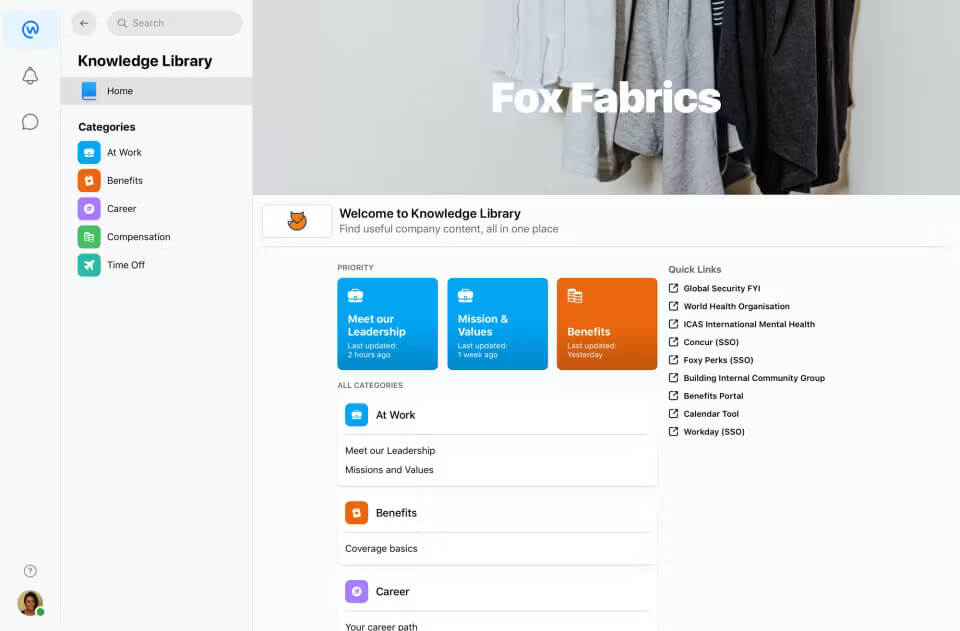
Workplace from Meta brings familiar social networking features (news feed, groups, live video) to internal communications for enterprise teams.
Pros
- Social-feed style engagement for company news
- Familiar mobile-first experience
- Broad device support
Workplace supports multi-channel internal comms, especially for distributed teams, but it tends to focus on engagement rather than structured AI-powered workflows or deep systems integrations.
6. Connecteam
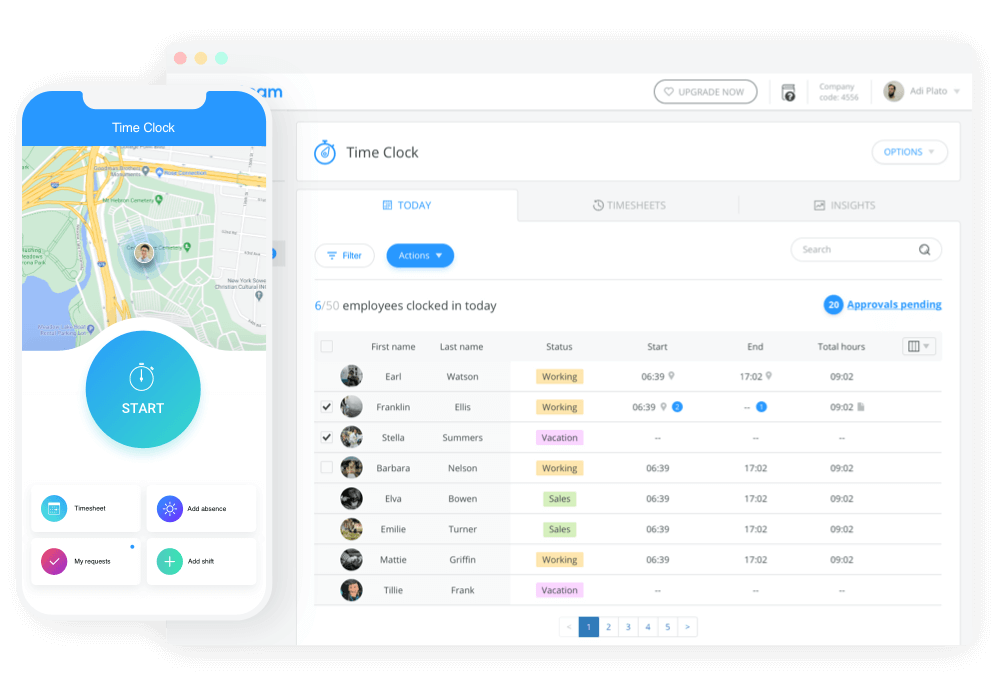
Connecteam is a frontline-focused platform that combines deskless employee communications with operational aspects like scheduling, directories, company news, and surveys.
Pros
- Suitable for frontline and mobile-first use cases
- Centralized company feed and engagement tracking
- Integrates with HR and operational systems
Connecteam bridges communication and day-to-day operations, but it doesn’t replace unified channels across all corporate functions.
7. Staffbase
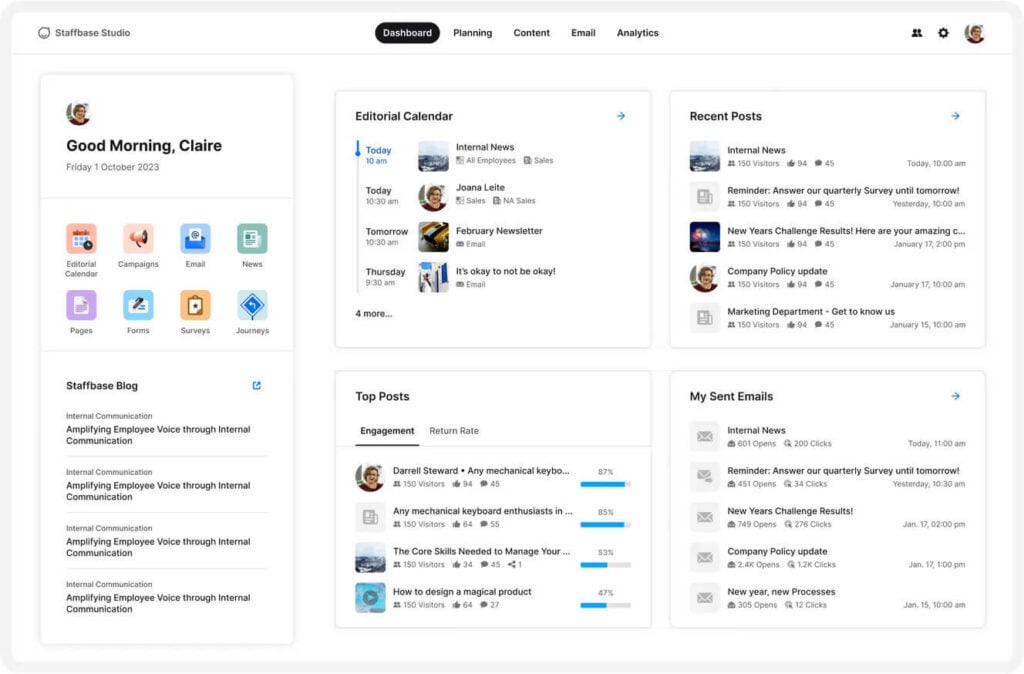
Staffbase is an employee communication platform centered on company-wide engagement, mobile-first news feeds, and targeted messaging.
Pros
- Branded internal communication hub with personalized content
- Mobile-first communication and segmentation
- Integrations with tools like Google Workspace
Staffbase is great for engagement and company-wide news, but it’s often paired with other systems to support real-time chat or enterprise telephony.
8. Firstup
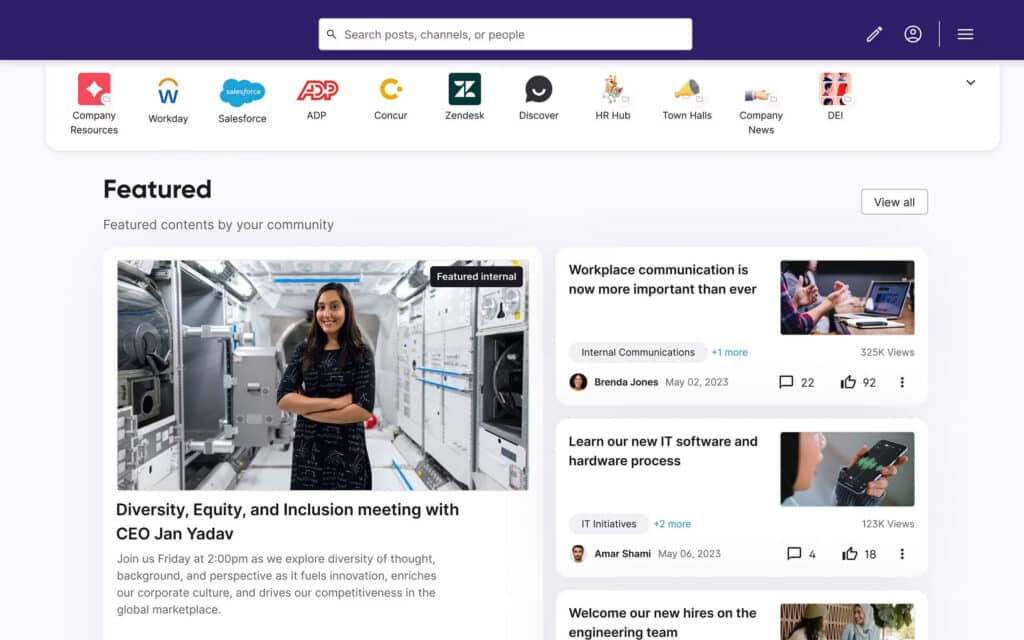
Firstup delivers targeted, personalized messaging across large, distributed workforces, with a focus on personalized communication, mobile engagement, and company-wide updates.
Pros
- Strong segmentation and personalized message delivery
- Mobile-first experience for frontline and deskless employees
- Integrations that support HRIS and enterprise workflows
Firstup is designed for structured messaging and updates rather than real-time chat or unified voice and video channels.
9. Google Workspace
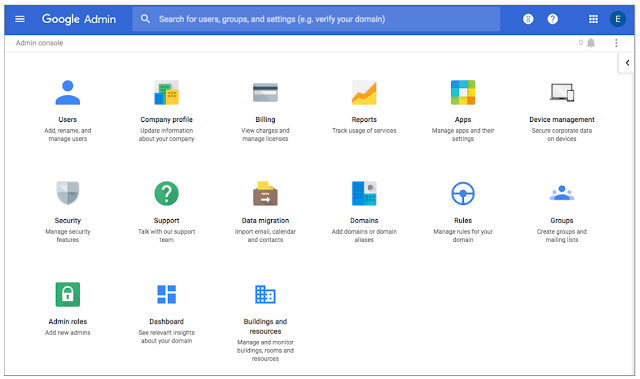
Google Workspace provides email, chat, Meet video, Drive storage, and collaboration apps, including frontline editions that support communication for mobile and field workers.
Pros
- Integrated productivity and collaboration suite
- Support for frontline and distributed teams
- Strong security and compliance capabilities
Workspace functions primarily as a productivity ecosystem and often requires additional tools for structured company-wide communications and internal news hubs.
10. Asana
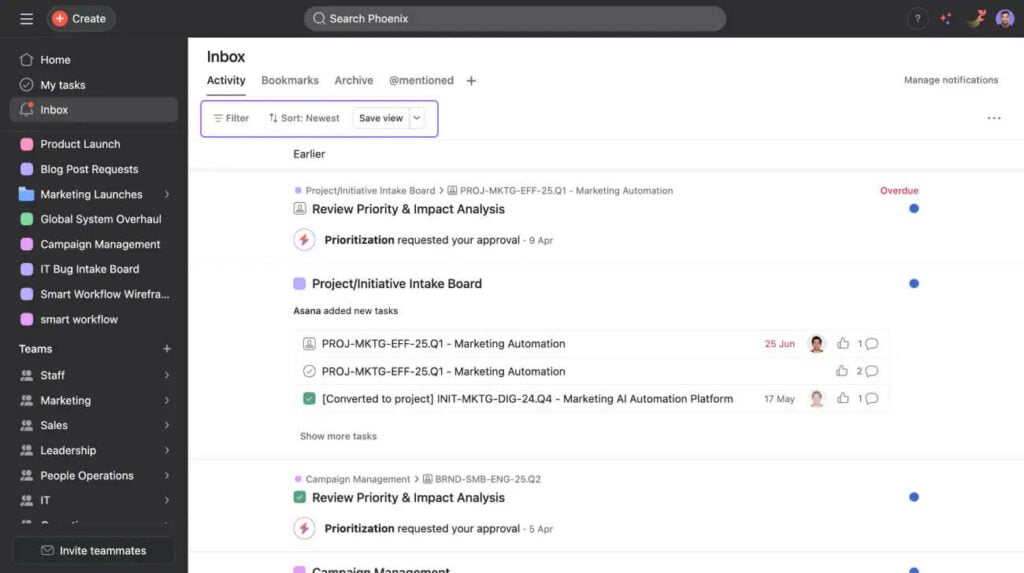
Asana is a work and project management platform that offers task communication, updates, and team alignment features.
Pros
- Connects communication to work and deliverables
- AI tools for workflow automation
- Integrates with collaboration tools
Asana improves task-oriented communication and visibility, but it’s not meant to serve as a primary platform for company-wide messaging or frontline engagement.
What an employee communication platform should solve
Mid-market leaders evaluating an employee communication platform already understand the stakes: Every missed update, buried message, or disconnected workflow slows execution and eventually shows up in the customer experience.
The right platform must remove friction across communication channels, strengthen alignment, and give distributed teams real-time visibility into what matters.
These core pain points shape the criteria that decision-makers prioritize.
Cross-department communication gaps
Teams lose time when updates move through different channels with no clear system of record. Sales waits on product. Operations waits on IT. Frontline managers wait on corporate. Those delays compound, creating inconsistent messaging and avoidable bottlenecks.
Clear internal communication plays a direct role in how well teams coordinate and stay engaged. When updates, conversations, and notifications live in one place, teams respond faster, reduce confusion, and maintain consistency across the organization.
Knowledge silos across locations
As organizations expand, information scatters across tools, threads, and shared drives. Employees struggle to find the context they need to do their jobs, which adds operational drag and weakens retention.
Strong internal communication requires a single workspace that brings knowledge sharing, file access, and real-time chat together. In hybrid environments, virtual huddle rooms can amplify collaboration—but only when the underlying communication platform removes fragmentation.
Frontline teams lacking context
Frontline and deskless employees often face delayed updates, limited training visibility, and inconsistent messaging. This lack of context directly affects customer interactions, safety, and service quality.
Since internal collaboration plays a major role in customer success, organizations that equip frontline teams with timely, segmented communication see faster execution and more consistent CX. A platform built for frontline workflows ensures every employee—not just knowledge workers—stays informed and aligned.
Confusion from juggling multiple tools
When employees switch between email, instant messaging, SMS, and multiple standalone apps, communication slows instead of streamlining. Tool sprawl leads to duplicated effort, missed follow-ups, and unclear ownership.
Consolidating communication into an all-in-one workspace reduces noise, preserves context, and keeps teams focused.
Limited visibility into conversations, decisions, or follow-ups
Leaders need a clear view of how work moves, not scattered messages across channels. Without visibility, small issues go unnoticed, decisions get lost, and teams repeat work.
Strong internal communication tools provide transparency across updates, tasks, and conversations while supporting governance and compliance requirements. That visibility helps organizations standardize processes, improve response times, and build healthier communication habits that scale.
These challenges share one downstream effect: Customer experience suffers when employees operate without clarity. A unified employee communication platform solves these gaps by connecting people, workflows, and knowledge, so every team member has the information and context to perform with confidence.
Essential features of a modern employee communication platform
To find an effective employee communication platform, look for capabilities that strengthen alignment, reduce friction, and scale across departments, devices, and locations.
The criteria below can help you separate point solutions from platforms that support long-term communication strategy, automation, and governance.
Unified communication channels
Organizations perform better when conversations, decisions, and follow-ups move through a shared, reliable system. Unified communication channels allow teams to transition easily between voice, video, and messaging without losing context or switching apps.
A voice-first foundation matters because many high-stakes interactions, including escalations, time-sensitive coordination, and sensitive information, still happen over the phone. Voice remains a critical part of internal communication, especially for distributed teams and customer-facing roles.
Key criteria include:
- Voice, video, and real-time chat in one environment
- File sharing, conversation history, and searchable knowledge
- Integrations with collaboration tools, including Microsoft Teams, Outlook, and project management systems
Many organizations lean on blended communication environments, such as Teams workspaces, to streamline collaboration across channels, while video meetings remain the anchor for team alignment across locations. RingEX supports these criteria with an all-in-one workspace, full telephony functionality, and more than 500 integrations that reduce the need for add-ons or redundant tools.
AI-powered communication tools
Modern internal comms depends on automation and augmentation. AI gives teams faster ways to process information, summarize conversations, and create visibility for leadership without adding administrative overhead.
For mid-market operations and IT teams, AI workflows strengthen efficiency and help standardize communication habits across departments.
Core AI capabilities include:
- AI Call Recaps that surface decisions, risks, and next steps
- AI-transcribed notes for accuracy and knowledge retention
- Real-time translation to support global team members
- Conversation summaries that help leaders track engagement and sentiment
- AI Assist for faster, more consistent responses
RingEX applies these features through agentic voice AI built directly into calls, messages, and meetings, enhancing the flow of information across internal communication channels.
Mobile-first access for distributed and frontline teams
Frontline and deskless teams often operate away from laptops and rely heavily on mobile devices for real-time updates, task management, and company news. Therefore, a modern employee app needs to offer consistent functionality across mobile and desktop, especially when organizations manage multiple locations and shift-based workflows.
Decision criteria include:
- Reliable mobile access across iOS and Android
- Push notifications for urgent updates or policy changes
- Offline access or low-bandwidth support for field environments
- Role-based segmentation for targeted communication
Mobile access becomes even more important as distributed workforces adopt hybrid models, where quick video check-ins and team conversations supplement in-office collaboration. RingEX supports this with a unified mobile experience that keeps frontline teams connected to voice, video, messaging, and automated notifications.
Security, governance, and compliance considerations
Enterprise and mid-market IT leaders evaluate employee communication platforms through a security-first lens. Internal communication touches sensitive information, such as HR workflows, operational updates, financial data, and customer escalations, and must be governed through role-based access, audit logging, and robust administrative controls.
Key considerations include:
- Identity management and Single Sign-On (SSO)
- Data encryption in transit and at rest
- Granular admin roles and workspace governance
- Compliance frameworks that align with industry requirements like the General Data Protection Regulation (GDPR) and California Consumer Privacy Act (CCPA)
- Reliability and uptime guarantees
A trustworthy platform must also perform consistently. RingCentral’s reliability standards, including 99.999% uptime, ensure continuous internal communication for critical operations. Security resources, such as secure communication features, reinforce the governance posture enterprise evaluators expect.
How employee communication platforms support cross-department collaboration
Modern employee communication platforms give organizations a unified way to streamline operations, improve responsiveness, and strengthen coordination between corporate, frontline, and customer-facing teams.
The value comes from collapsing communication gaps that create unnecessary delays—and from improving the flow of information that shapes day-to-day decisions. When teams operate from the same real-time workspace, leaders gain the frontline intelligence they need to improve workflows, customer experience, and retention.
Breaking down silos across ops, CX, sales, and corporate teams
Operational bottlenecks form when updates move slowly between departments or through isolated channels. Teams need real-time communication to respond to issues quickly, escalate customer inquiries, and coordinate next steps without searching through fragmented apps.
Many organizations use a combination of messaging, meetings, and live support channels to enhance speed and clarity, which benefits both employees and customers. An employee communication platform reduces friction by standardizing how those interactions flow between ops, CX, sales, and corporate functions, enabling:
- Faster handoffs between departments
- Clearer workflows for escalations and approvals
- Shared visibility into decisions, tasks, and progress
This cross-functional alignment strengthens operational consistency and improves how internal teams support customer-facing interactions.
Centralized knowledge sharing and searchable conversation history
A modern communication workspace brings conversation history, file sharing, and structured knowledge into one searchable environment.
In addition, AI-driven visibility adds value by highlighting decisions, follow-ups, and context from past interactions, ensuring teams rely less on tribal knowledge. Collaborations enhanced by AI become even more effective when integrated with advanced video communication workflows.
Centralized knowledge sharing helps teams:
- Reduce repeat questions and manual rework
- Maintain consistent messaging across locations
- Strengthen institutional knowledge with AI-enhanced summaries
These capabilities give distributed and frontline teams the context they need to act confidently and consistently.
Multi-location visibility and consistency
Scaling communication across multiple locations, including retail stores, field teams, regional offices, or contact centers, requires shared standards. A strong employee communication platform supports unified workflows and helps leaders maintain consistency across every interaction, whether internal or customer-facing.
Capabilities that improve multi-location coordination include:
- Standardized processes that guide messaging, updates, and escalation paths
- Shared communication channels that keep every team aligned
- Unified internal and customer-facing interactions that increase clarity for both employees and customers
Centralized team knowledge management reinforces this consistency, enabling quicker decision-making while preserving operational insights over time.
Together, these capabilities reduce variability across locations and give leaders the visibility they need to optimize workforce alignment at scale.
How to choose the right employee communication platform: A buyer checklist
A strong employee communication platform should simplify operations, improve visibility, and align every team. The following criteria can help you determine whether a platform can remove friction, support frontline engagement, and scale across multiple locations. It focuses on operational outcomes, not features alone, and reflects the communication habits that high-performing teams already follow.
Does it unify all communication channels?
A modern platform should bring together voice, video, real-time chat, SMS, notifications, and file sharing in one workspace.
Look for:
- A single interface for all communication modes
- Shared conversation history across devices
- Voice-first capabilities that support urgent and sensitive workflows
Does it eliminate the need for multiple disconnected tools?
You lose momentum when you manage communication through email, messaging apps, task tools, and mobile apps that don’t speak to one another. Consolidation reduces noise, speeds up onboarding, and provides cleaner insights into activity and engagement.
Indicators of strong consolidation include:
- Messaging, meetings, and project-related conversations in one system
- Automated alerts and workflows powered by AI
- Centralized company news and internal communication channels
Can frontline employees and distributed teams use it easily?
Frontline teams need mobile access, simple interfaces, and real-time notifications to stay aligned. If a tool doesn’t support deskless roles, it won’t scale and will delay customer-facing processes that depend on timely communication.
Evaluate accessibility by asking:
- Does the mobile app deliver the same functionality as the desktop version?
- Can teams receive segmented updates based on role, location, or shift?
- Does the platform support low-bandwidth or on-the-go use cases?
Is AI built into the workflow—or bolted on?
AI should enhance daily communication, not exist as a separate layer. Embedded AI should help recap conversations, translate messages, automate tasks, and capture decisions without extra effort.
AI that actually moves work forward includes:
- Automated summaries for calls, meetings, and real-time chat
- Translation for distributed or global teams
- Workflow automation that reduces manual follow-up
Will it scale with multi-location operations?
Growth puts pressure on internal communication. Multi-location teams need consistent processes and shared systems that reinforce standardization.
Scalable platforms support:
- Centralized administration and governance
- Role-based permissions for location leaders
- Shared communication templates for repeatable workflows
Does it support compliance and governance?
Security requirements scale as your organization expands. Employee communication must align with data protection standards, industry regulations, and internal governance models.
A compliant platform typically offers:
- Data encryption across channels
- Audit logs and administrative controls
- Reliability commitments for critical operations
Does it integrate into existing tools and CRMs?
The platform should fit into your existing technology ecosystem without forcing teams to restructure workflows. Integrations with HRIS, CRM, project management, and collaboration systems reduce friction and make communication part of your operational backbone.
Integration considerations include:
- Prebuilt connectors for frontline systems and enterprise apps
- Syncing for contacts, tasks, and notifications
- Open APIs for custom use cases
A checklist like this helps you evaluate not only functionality, but also how the platform strengthens communication habits and operational alignment.
See how RingEX strengthens team communication
RingEX unifies voice, video, real-time chat, SMS, and mobile access into a single employee communication platform, helping teams eliminate silos, boost engagement, and streamline internal communication across locations.
Mobile access, automated notifications, and integrated task communication elevate the employee experience across frontline and distributed teams, while leadership gains reliable visibility into conversations, follow-ups, and decisions, all backed by enterprise-grade security and 99.999% uptime. As your organization scales, this unified communication environment ensures consistent processes, stronger engagement, and more predictable cross-department coordination.
Reach out to explore how RingEX’s unified voice, video, and messaging can help your teams stay aligned, responsive, and ready to act.
The post Buyer’s guide to choosing an employee communication platform appeared first on RingCentral Blog.