
How agentic voice AI helps teams stay aligned, reduce busywork, and scale collaboration without adding complexity.
Coordination breaks down in small ways first. A meeting ends, but no one knows who owns the follow-up. A customer calls back, and the context is gone. Someone asks, “Did we decide this already?” and three people check three different tools.
As teams grow, collaboration doesn’t break down because people stop working but because coordination lags. Conversations happen faster than systems can keep up, follow-ups rely on memory, and meetings multiply just to reconnect the dots.
AI collaboration tools solve this. They listen to conversations, capture intent, route requests, and retain context so decisions stick and work moves ahead.
If you’re evaluating tools, the information below can help you avoid meeting overload, speed up follow-ups, and collaborate effectively.
Key takeaways
- The best AI collaboration tools support conversations before, during, and after they happen
- If you already use four to six tools for calls, meetings, notes, and follow-ups, unified platforms reduce cost, context loss, and admin work
- Voice-first AI keeps decisions, context, and follow-ups connected
- RingEX brings calling, messaging, video, and AI into one platform for scaling teams
What are AI collaboration tools?
AI tools are platforms that use artificial intelligence to accelerate decision-making, reduce manual tasks, and keep conversations moving across voice, video, messaging, and documents. They make teamwork faster by handling follow-ups, note-taking, routing, and coordination.
On a busy day, voice-first AI can answer calls, route requests, transcribe meetings, surface relevant files, and highlight action items. This ongoing support eliminates the coordination work that typically slows teams.
Employees are ready for this shift. McKinsey research shows 94% already use AI and believe it will replace at least a third of their repetitive work. By meeting teams where they already are, AI collaboration tools can help fast-growing companies stay aligned and move faster.
Top 10 AI collaboration tools in 2026
Teams don’t need more tools—they need AI that reduces noise with fewer logins, fewer tabs, and fewer places where work can fall through the cracks. This list focuses on platforms that bring AI into a unified workspace, especially those that apply agentic voice AI across phone, meetings, and messaging.
| Tool | Real-time communication (voice/video/chat) | Secure file storage and sharing | Task and project management | Workflow automation | Integrations (apps and APIs) | Security and compliance features |
| RingEX (RingCentral) | Yes, calls, video, messaging | Yes, in-app file sharing | Partial (lightweight tasks) | AI workflows for call handling, summaries, routing, and follow-ups | Over 500 integrations—customer relationship management (CRM), productivity tools | Enterprise-grade, 99.999% uptime, global compliance with security and regulatory standards (SOC, GDPR, HIPAA, FINRA) |
| Grain | Layers on top of video meetings (e.g., Zoom) to record, clip, and share moments | Stores recordings and highlights, optimized for knowledge sharing | No, outputs typically feed other tools | Automates post-meeting outputs (clips, notes) | Integrates with meeting and documentation tools | SOC 2–compliant |
| Notion AI | Asynchronous only, comments and docs, no live voice/video | Primary workspace for documents and knowledge | Strong project and knowledge management | AI-assisted content and workflow automation | APIs connect to dev, CRM, and analytics stacks | Enterprise security with documented AI data handling |
| Linear Assist | No, just async product and engineering workflows | Only attachments tied to issues | Fast, structured issue tracking and project planning | AI reduces operational overhead (triage, prioritization) | Integrates with dev tools (GitHub, Slack, Sentry) | Security controls documented in trust resources |
| Loom AI | Asynchronous video messaging, not live collaboration | Video libraries with controlled sharing, not general file storage | No native task tracking | AI generates summaries and action items from videos | Strong integrations with project and documentation platforms | Enterprise security and privacy controls |
| Fireflies.ai | Joins live meetings as an assistant, does not host calls or chats | Stores transcripts and audio, focused on meeting records | No, actions sync to external tools | Automates notes and follow-ups via integrations | Broad integration coverage across CRMs and PM tools | SOC 2, GDPR, optional HIPAA compliance |
| Asana AI | No real-time voice or video collaboration | Attachments supported, but relies on external storage | Full project and portfolio management with AI prioritization | Rules and AI automation streamline work intake and execution | Large integration ecosystem across sales, marketing, and engineering | Enterprise-grade governance and access controls |
| Gong | Captures calls and meetings, not day-to-day team communication | Conversation libraries for revenue intelligence | No task management, insights flow into CRM | Automates revenue workflows (coaching, deal insights) | Deep CRM and sales-stack integrations | Strong compliance for customer conversation data |
| Slack AI | Real-time chat with lightweight huddles, voice remains secondary | File sharing in channels, backed by external storage | Basic task tracking through lists and apps | Workflow Builder and AI automate approvals and notifications | One of the largest SaaS integration ecosystems | Enterprise security and AI controls |
| Otter.ai | Acts as a meeting participant, not a communication host | Stores transcripts and recordings | No project management—outputs push into PM tools | Automates summaries and follow-ups | Integrates with meeting and work tools | Privacy-forward security with regulated-industry options |
1. RingEX
RingEX, RingCentral’s AI-powered unified communications hub, consolidates phone, video, messaging, SMS, and fax into a single app with 99.999% uptime and hundreds of integrations. It captures the essentials from every conversation—decisions, owners, next steps, and customer requests—so nothing gets lost or forgotten.
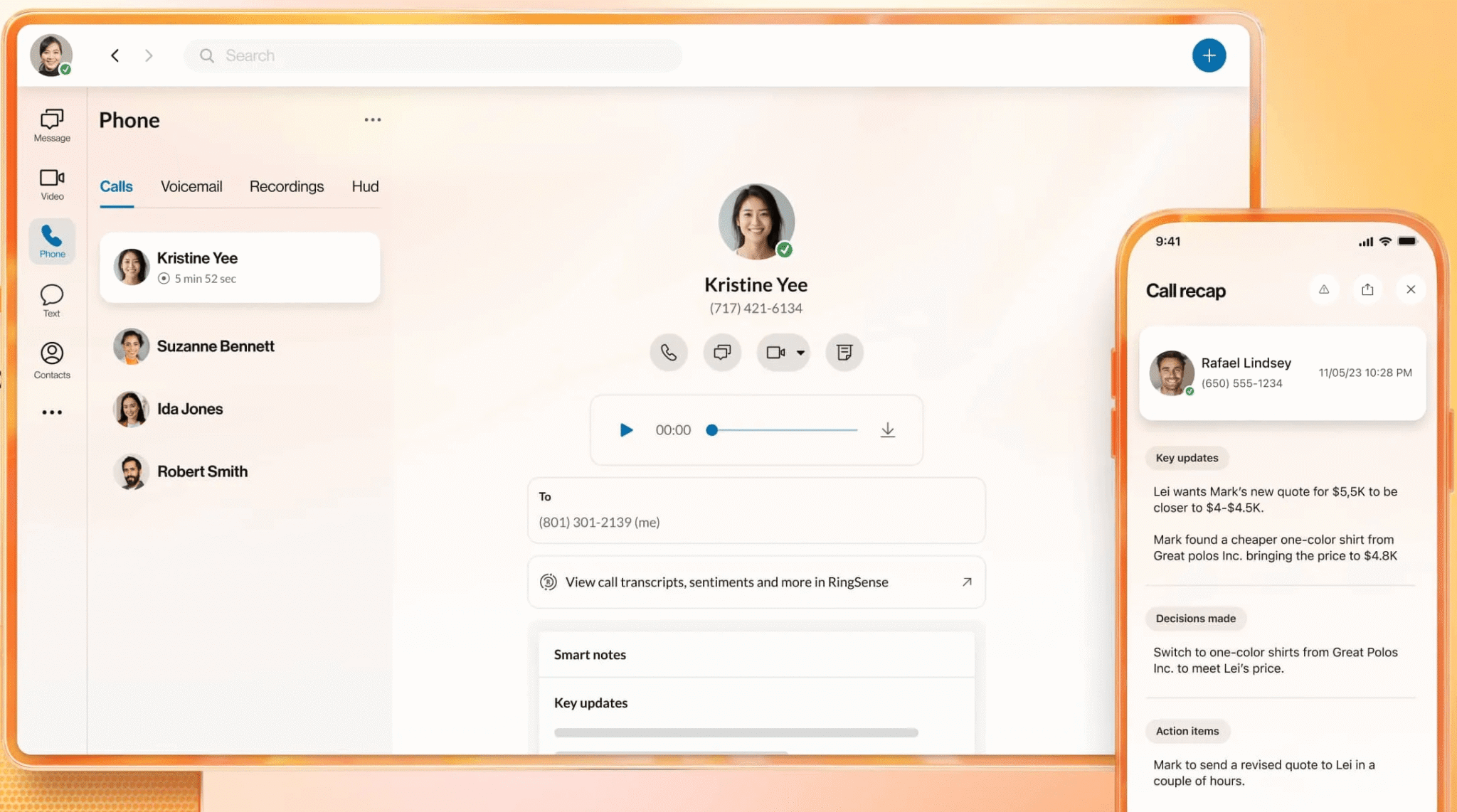
Instant clarity with AI Conversation Expert for meetings
Instead of relying on manual notes, AI Conversation Expert (ACE) captures conversations automatically and converts them into structured, shareable outputs. It generates AI-powered summaries that surface key decisions, action items, and next steps to reduce reliance on manual notes.
Rather than requiring you to switch between recordings, chats, documents, and task systems, ACE keeps everything in a single place, reducing rework and ensuring a single version of the truth. This also allows remote teams to catch up quickly without rewatching long meetings or asking for summaries.
Agentic voice AI: AIR, AVA, ACE
RingCentral uses agentic AI to guide collaboration before, during, and after every interaction:
- Before: AIR (AI Receptionist) handles the front-end work that usually slows teams down. It captures intent, gathers context, and routes callers to the right person or queue.
- During: AVA (AI Virtual Assistant) assists collaboration across voice, video, and messaging by helping capture context, surface relevant information, and support follow-ups during phone calls, video meetings, and team messaging, without interrupting how your team naturally works.
- After: ACE (AI Conversation Expert) converts conversations into structured insights. It identifies action items, sentiment patterns, and recurring themes for clearer insight into what needs attention.
Together, AIR, AVA, and ACE create a full-cycle intelligence system that makes team collaboration clearer, faster, and more consistent.
A single platform for consistent communication
RingEX keeps your calls, messages, and meetings in one place, allowing you to move from chat to a call to a video meeting without losing context. Fewer tools mean fewer mistakes, cleaner handoffs, and one clear record of what was said and decided. As you scale, everyone works the same way because the system is consistent across all locations.
As collaboration scales, security and compliance remain a focus. RingEX is built on an enterprise-grade communications infrastructure designed to protect sensitive data. You retain full control over your calls, messages, meetings, transcripts, and AI-generated summaries—including permissions, retention policies, and audits.
2. Grain
Grain helps you turn long calls into short, searchable highlights, allowing you to capture decisions without digging through full recordings or taking pages of notes.
Grain sits on top of your existing meeting tools (Zoom, Google Meet), making it easy to extract insights without changing how your team members run calls.
Pros
- Provides highlight-driven sharing: You can grab a 15–60 second clip and drop it directly into Slack, email, or a project thread.
- Generates searchable transcripts: Past conversations become easy to retrieve, which is especially helpful for customer research, sprint reviews, or stakeholder updates.
- Fits into your existing workflow: Grain works with the tools you already use, meaning you don’t have to learn a new platform.
3. Notion AI
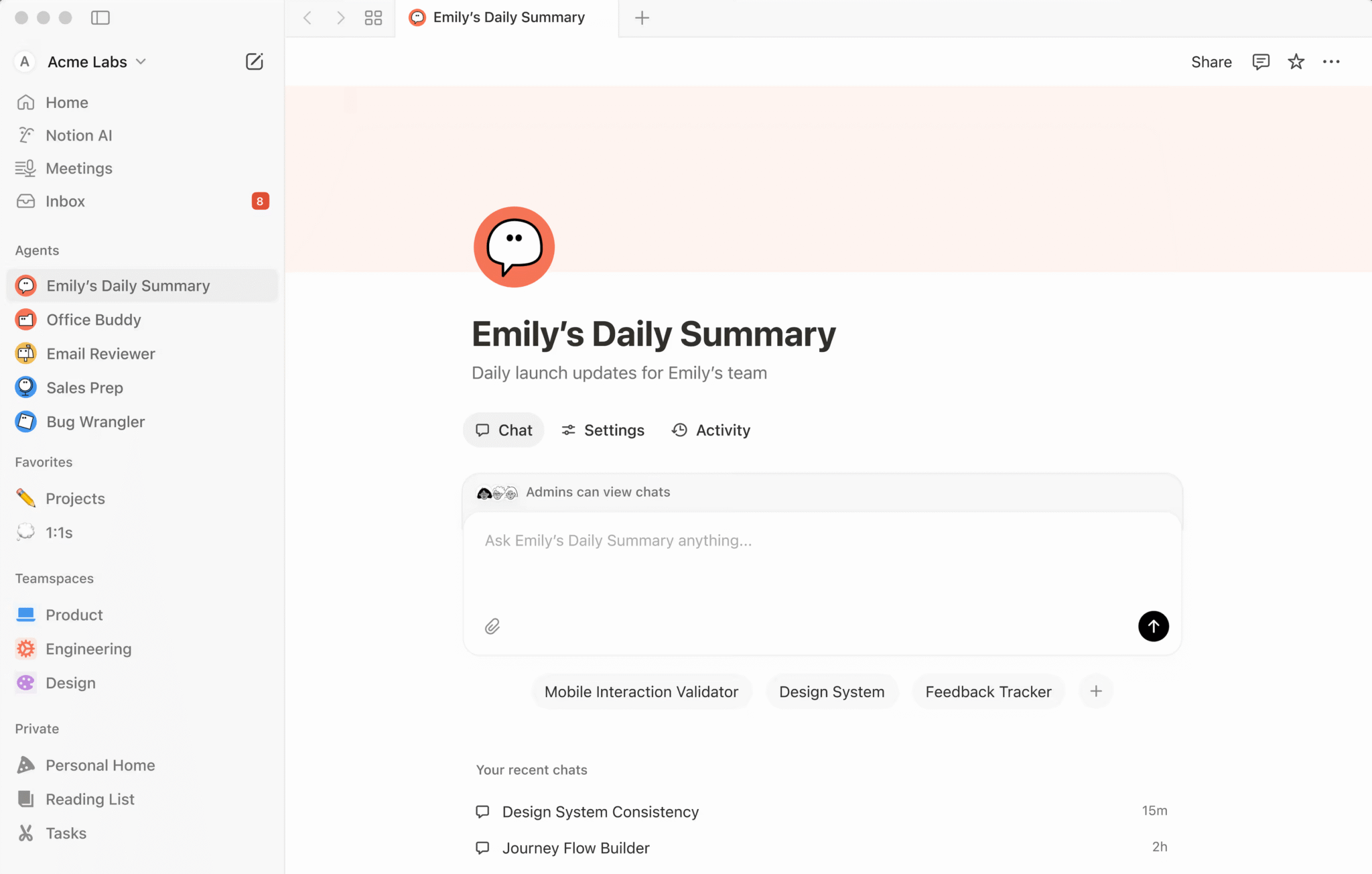
Notion AI speeds up work within Notion by automating documentation and planning. It can summarize long notes, extract action items, rewrite unclear text, generate first drafts for project docs, and turn raw meeting notes into organized pages. Because it sits inside Notion’s workspace, anyone on the team can clean up pages, standardize updates, or create new content without leaving the tool.
Pros
- Automates daily documentation: Summaries, action-item extraction, text clean-up, and rewriting help you keep pages updated without manual effort.
- Generates quick drafts for everyday work: Notion can create project briefs, job descriptions, roadmap updates, user stories, and outlines instantly.
- Works across all Notion surfaces: AI can improve docs, tasks, databases, and wikis, to keep you organized as information grows.
4. Linear Assist
Linear Assist can help your product and engineering teams move faster by automating administrative work related to issues, specs, and sprint planning. Its AI can understand your workflows, automatically assigning the right owners, labels, and projects based on past patterns while identifying duplicates and surfacing related work. You can also use AI agents to generate code, draft specs, or take entire issues from start to finish.
Pros
- Reduces triage work: Triage Intelligence automatically assigns issues, flags duplicates, and organizes work based on your team’s history.
- Scales output: You can delegate tasks such as code generation, spec drafting, or full issue handling.
- Keeps everyone aligned: Semantic search and Pulse updates help your team members find information faster and stay on top of progress without long status meetings.
5. Loom AI
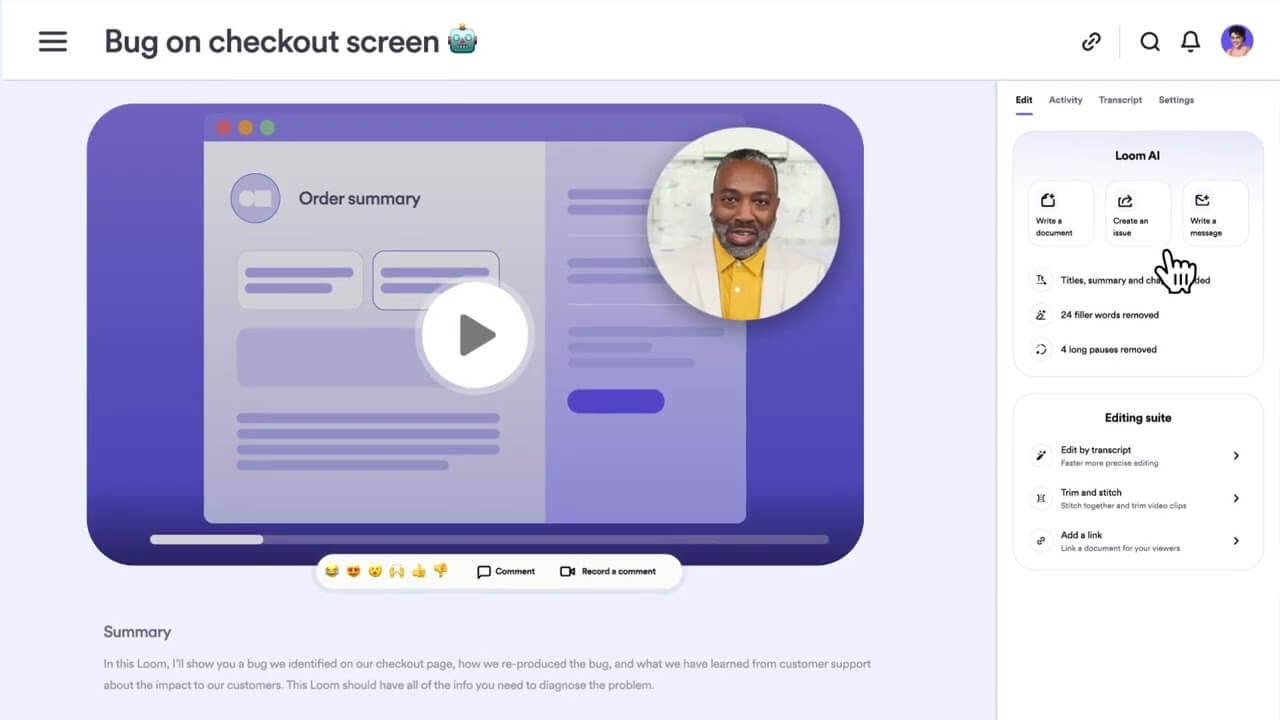
Loom AI makes async communication easier by cleaning up your Loom videos (removing filler words and silence); generating a title, summary, chapters, and tasks; and creating a written document based on what you explained. It can also turn a Loom into a Jira or Linear issue, draft a DM or email with context included, or serve as AI-powered meeting notes with recaps and next steps. It’s designed for teams who want clear updates or walkthroughs without spending time editing videos or rewriting explanations.
Pros
- Creates instant summaries for async updates: Your team can read the recap or jump to specific moments without watching the entire video.
- Generates clear action items: AI extracts tasks and next steps, reducing back-and-forth messages.
- Supports demos and handoffs: The tool makes explanations easier to consume across time zones and teams.
6. Fireflies.ai
Fireflies.ai helps capture meeting details automatically by recording, transcribing, and summarizing calls across major platforms, like Zoom, Google Meet, and Microsoft Teams. It generates searchable transcripts, topic-based summaries, and highlighted action items, helping you avoid manual note-taking, speed up follow-ups, and keep records of customer calls, interviews, or internal collaboration.
Pros
- Offers reliable meeting capture: Fireflies.ai automatically records and transcribes calls so no one has to take notes.
- Creates searchable transcripts and summaries: The searchable format makes it easy to find specific moments, decisions, or customer quotes.
- Works across platforms: It integrates with major meeting tools and CRM to support organized follow-ups.
7. Asana AI
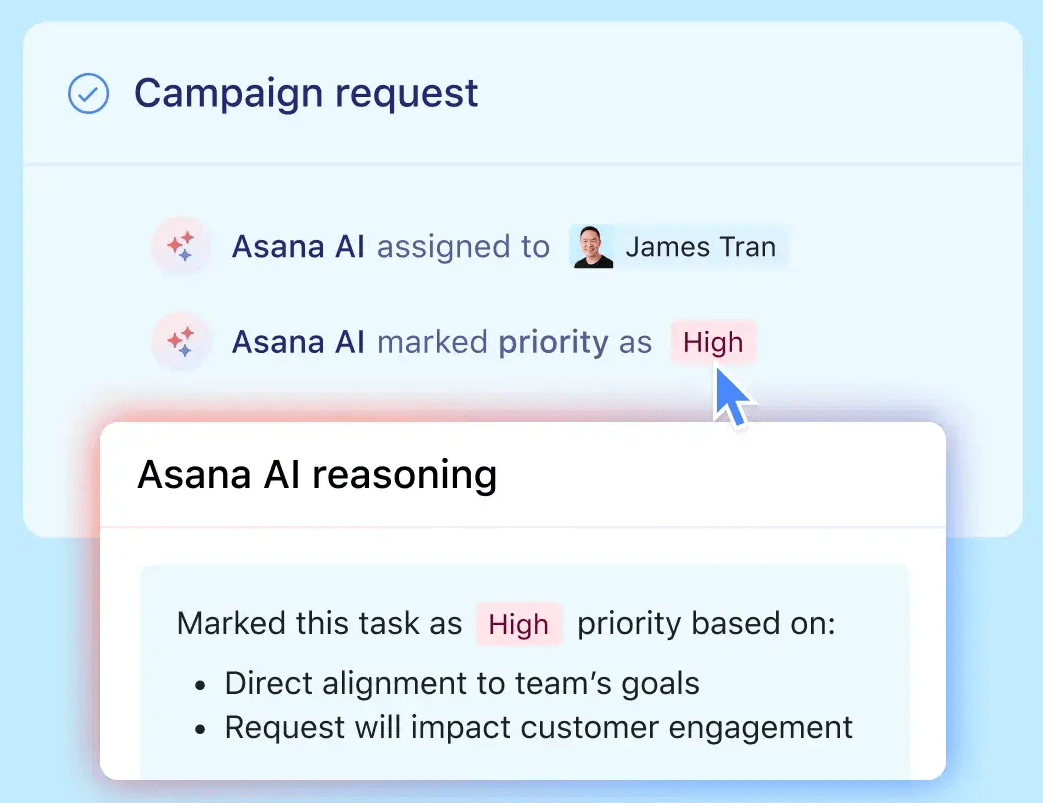
Asana AI helps you stay on top of projects by automating routine work inside Asana. It can generate task descriptions, suggest project steps, summarize long threads, and surface risks or blocked work without manual review. Asana’s AI Studio also lets you build simple no-code workflows, giving AI the context it needs (projects, goals, portfolios) to prioritize tasks and make relevant recommendations.
Pros
- Creates auto-structured tasks: Asana AI turns rough notes into clear tasks with descriptions and steps.
- Provides fast status clarity: Summaries highlight progress, blockers, and owners without you needing to dig through threads.
- Delivers smarter automation: AI Studio guides AI with goals and context to create tailored workflows.
8. Gong
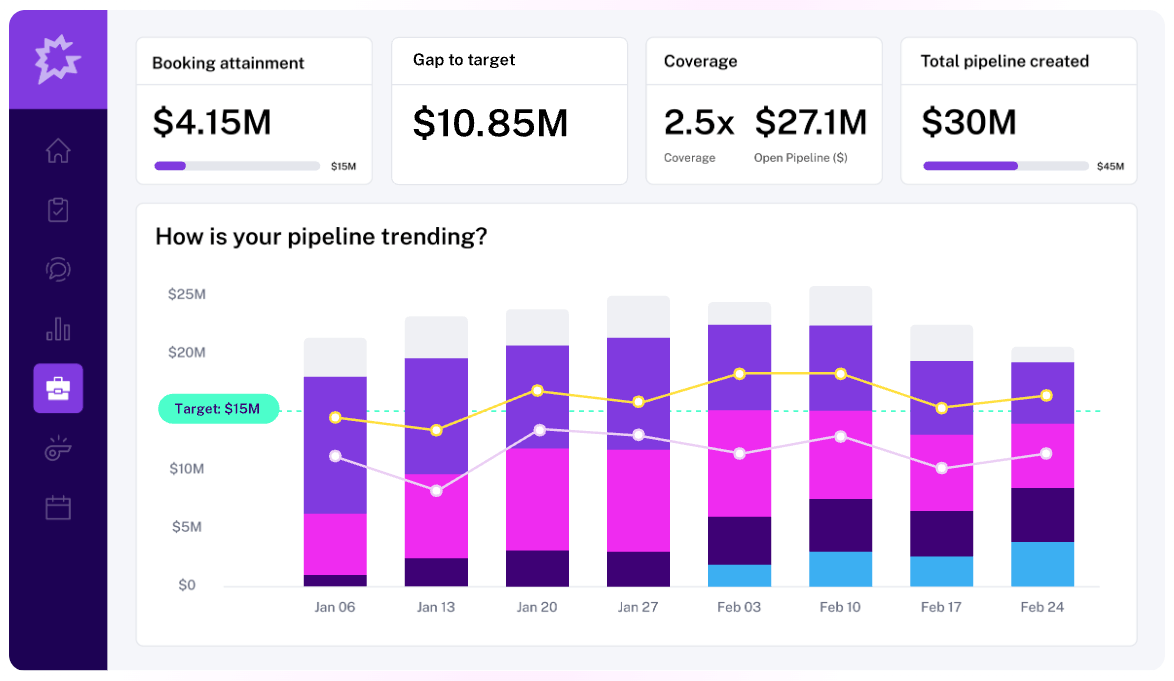
Gong helps your revenue team understand what’s happening in its pipeline and what to do next. It pulls in calls, emails, and CRM activity, then uses AI to show which deals are healthy, which are at risk, and the actions reps should take. Gong’s AI agents handle busywork by updating pipeline fields, sending follow-ups, and triggering coaching alerts, while Gong’s dashboards track forecasts, deal progress, and team performance in one place.
Pros
- Offers clear deal and forecast visibility: Gong’s dashboards show deal health, risks, and next steps across the entire pipeline.
- Removes admin work: It automates follow-ups, pipeline updates, and coaching triggers.
- Supports all GTM teams: Gong’s AI-driven Revenue Analytics and Forecast features help Sales, RevOps, CS, and leadership stay aligned on revenue drivers.
9. Slack AI
Slack AI helps you get work done inside Slack by summarizing channels and threads, answering questions using your company’s knowledge, and helping you find information across messages, files, and connected apps like Google Drive or Salesforce. Its built-in AI, Slackbot, acts as a partner you can talk to like a teammate to prep for meetings, analyze documents, or create briefs without leaving a conversation.
Pros
- Summarizes to eliminate scrolling: Channel recaps, thread summaries, and daily digests help you catch up quickly.
- Answers from company knowledge: AI searches messages, files, and connected tools to surface the right context.
- Works quietly in the background: Slack supports automation, translation, and meeting notes without disrupting how you already use Slack.
10. Otter.ai
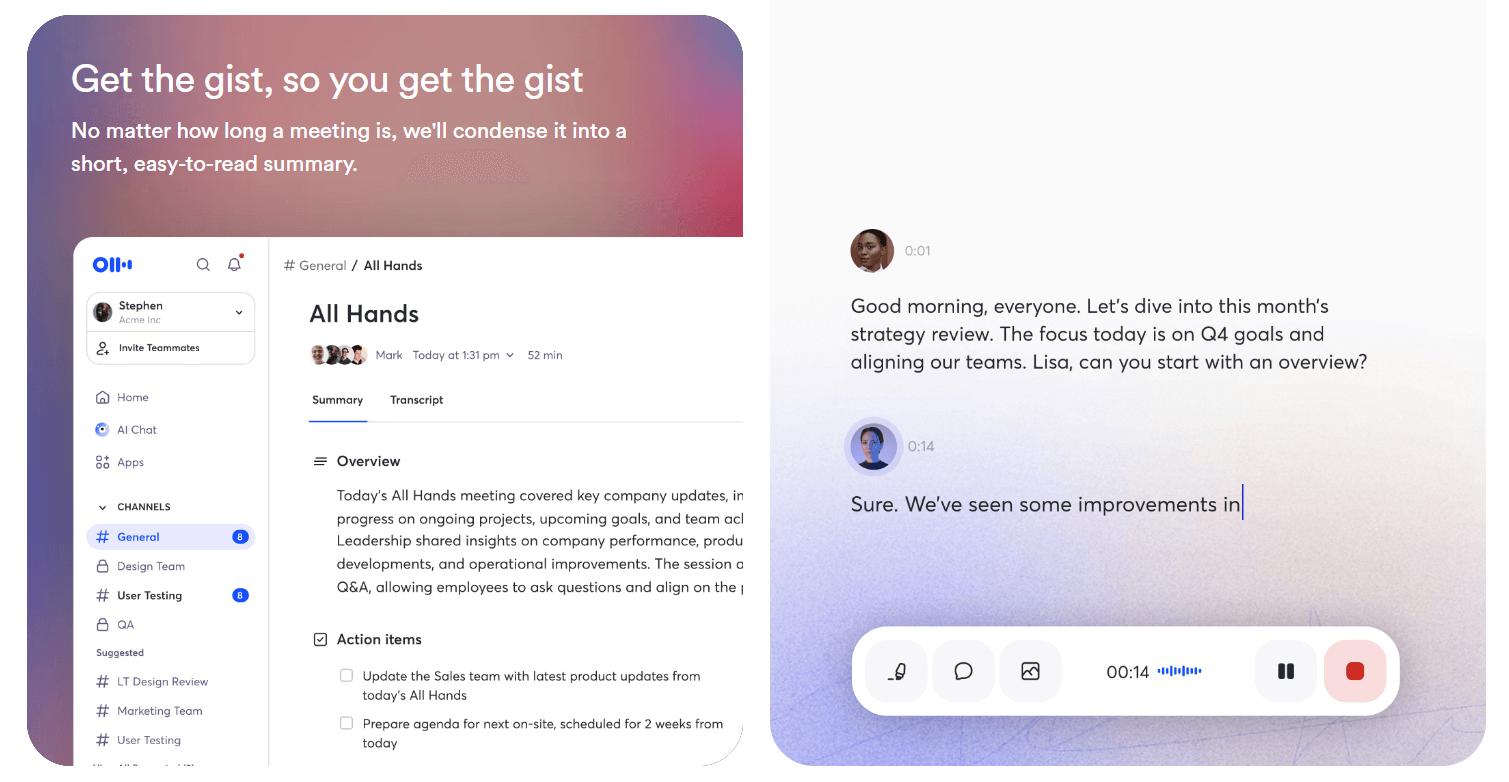
Otter.ai helps turn conversations into searchable information you can reuse. It records meetings, creates high-accuracy live transcripts, generates short summaries, and pulls out action items automatically. You can also use Otter AI Chat to ask questions across past meetings, extract key points, or draft follow-ups and emails.
Pros
- Generates reliable transcription and summaries: It creates accurate transcripts and concise recaps so teams don’t need to take notes manually.
- Lets you search and ask questions later: AI Chat lets you query past conversations to find decisions, context, or next steps.
- Fits into existing workflows: Otter.ai syncs notes and action items into tools like Slack, Google Meet, Asana, Jira, Notion, and CRMs.
Key features to look for in AI collaboration tools
Most lists of top AI collaboration tools focus on feature checklists without explaining why they matter. Here are the core features to look for when assessing AI collaboration tools for a true workflow fit.
Real-time meeting intelligence
At a minimum, AI collaboration should turn every meeting into clear, consistent outcomes, not just a recording.
When you’re evaluating options, look for three capabilities working together:
- Live transcripts with speaker attribution: Accurate, scannable transcripts make conversations searchable and remove ambiguity about who said what.
- Real-time summaries with clear action items: The AI should identify decisions, owners, and next steps as the meeting unfolds, not reconstruct them later.
- Automatic organization of outcomes: Decisions, blockers, and follow-ups should follow a consistent structure so you can align faster and track progress more easily.
These features create the difference between “we had a good meeting” and “we know exactly what happens next.” If someone misses the call, they can review the AI output and move the work forward without chasing anyone for clarification.
Cross-channel support
AI collaboration tools should work everywhere conversations happen, not just in chat or meetings. Prioritize tools that maintain context across both voice and digital channels.
The strongest tools support:
- Voice conversations, with call summaries, intent capture, and sentiment awareness
- Digital channels, with message drafting, translation, and knowledge suggestions
- Context continuity, so information carries forward as conversations shift channels
That’s where agentic voice AI differs from generic copilots. Instead of reacting only when prompted, it supports collaboration before, during, and after interactions. For example, in RingEX, AI Virtual Assistant (AVA) works across voice, video, and messaging, helping route conversations, assist in real time, and preserve context through summaries and follow-ups.
Workflow automation that reduces manual updates
If your team still copies notes into tickets, pings people to follow up, and manually updates systems after calls, you are not getting the real benefit.
The right AI collaboration platform should offer the following high-value automations:
- Task creation from meetings: Action items auto-created in your project tool
- Knowledge surfacing: AI suggestions for the right doc, policy, or previous decision during a conversation
- Automated reminders and follow-ups: Nudges that tell you when deadlines get missed
Choose one workflow you use every day (sales handoff, support escalation, project kickoff) and confirm the tool can automate at least two manual steps without custom setup.
Unified platform data
Many decisions get made during calls, meetings, and quick huddles. When conversation data lives in meeting docs, chat messages, or CRM notes, updates get delayed and context gets lost.
Unified platforms, like RingEX, keep calls, meetings, and messages in the same system. This ensures data is structured automatically rather than reconstructed later, making post-conversation intelligence reliable at scale.
Why voice-first AI is the new standard for collaboration
Most AI collaboration software were built around text: documents, chat threads, and comments. But modern teams increasingly make decisions in real time, through calls, meetings, and fast problem-solving conversations.
With collaboration shifting to live interactions, voice-first AI meets teams where work actually happens.
Conversations drive the majority of business decisions
In modern organizations, decisions are made through interaction, not documentation.
Microsoft research shows that the average employee spends 57% of their time communicating in meetings, email, and chat, and 43% creating content in documents, spreadsheets, and presentations. With the majority of a team member’s time going toward discussing issues, aligning priorities, and resolving blockers, documents usually only reflect decisions after the fact, if at all.
AI needs context to provide accurate insights
Unified communications change the inputs AI works with. When voice, video, and messaging are part of the same system, AI can operate on the complete interaction history rather than isolated events. It can see:
- What led to a discussion
- What was agreed verbally
- What follow-up happened afterward
In RingEX, AI is built into the communication layer itself. The RingEX AI assistant preserves context as work moves across channels, resulting in accurate summaries, consistent follow-ups, and insights that reflect how teams actually communicate.
How to choose the right AI collaboration tool for your team
The following checklist can help you cut through functionality summaries and focus on what will actually reduce friction for your team:
- Can the AI understand real conversations across every channel? Look for AI that works where collaboration happens, not just in documents or chat summaries. Voice-first context matters when decisions are made live.
- Will it remove manual work or create another system to maintain? The right tool captures notes, routes requests, and triggers follow-ups automatically. If your team still has to copy, paste, or re-enter information, you’re adding drag, not removing it.
- Can your team adopt it quickly? Fast-growing teams don’t have time for long rollouts. Prioritize tools that fit into existing workflows and start delivering value in days, not months.
- Does it reduce tool sprawl? Every extra app increases cost, context switching, and risk. Unified platforms simplify collaboration by keeping conversations, context, and actions in one place.
- Can leaders see what’s happening without micromanaging? Look for built-in visibility, such as conversation summaries, trends, and workload signals, to spot issues early without attending every meeting.
- Does it meet your security, compliance, and governance requirements? As teams scale, AI must respect data controls, permissions, and industry standards, especially when handling voice and customer conversations.
AI collaboration tools should make teamwork feel effortless
When collaboration works, meetings end with clear owners, calls keep context, and follow-ups happen without chasing anyone down.
A good AI collaboration tool makes it easy to capture decisions, route requests to the right place, and trigger next steps so work doesn’t reset after every conversation. It supports collaboration before, during, and after interactions, especially in voice and meetings where decisions are made.
RingCentral is built around that reality. Its unified platform and agentic voice AI features keep conversations connected, actions tracked, and teams in sync as they scale.
If your team’s collaboration still seems noisy or slow, it’s time to see how it feels when the friction is gone. Explore how RingCentral can help you collaborate with less effort and greater clarity.
The post Top 10 AI collaboration tools for fast-growing teams appeared first on RingCentral Blog.